Images are your #1 resource for promoting your work. Here’s a little introductory tutorial to images.
Digital images are nothing more than a collection of colored pixels (tiny squares) all arranged to create the illusion of an image. This is why we measure images in pixels rather than inches. An image that is 800 x 1600 is 800 pixels wide and 1600 pixels tall. A pixel is a fairly standard unit of measure — more or less.
The image file contains all the information about where specific pixels go and how big they should be. It’s quite magical.
❖
PNGs, JPGs, and GIFs, Oh my!
There are three primary types of image files that you need to know about. Each type has its own special properties. You can choose the type for your image in most graphic programs just by selecting a different file extension from the drop-down when you “Save As”. The program will do the translation for you.
JPG or JPEG.
Tend to be smaller and load faster than other types.
You cannot make them bigger than they already are without losing clarity. You can make them smaller without worry, though this too has its limits.
They turn transparent areas into white areas automatically. They do not do transparency.
PNG
Tend to be bigger and load slower than other types.
Resize better than JPGs, but even they have their limits and will get “pixelated” if you push them.
They retain transparency. If you have transparency in your image, then you want to save-as with the .PNG file extension.
GIF
Only used for animated images, usually ones that loop (start over and repeat automatically)
These require some artistic savvy or a special program to create.
Tend to be bigger and load slower than other types.
If you have an image with animations, then you will probably save it as a GIF, if not an actual movie file.
❖
Resizing Images
At the most basic, you won’t ever have to do more than resize your images.
You can find programs that will let you resize your images.
If you’ve never used an art program before, start here. Adobe offers a free online app called Photoshop Express that is easy to use and gives you many options for resizing, customizing, and cropping your image. It’s fantastic for beginners.
Gimp is free and a very popular one, especially among game designers. It has many of the features that you will find in a more advanced program like Adobe Photoshop.
Windows comes with a free program called “Paint.” Simply open your start window and search for “Paint.” It’s basic, but it works great for simple tasks.
❖
Tips & Best Practices
Ask your publisher for a “high resolution” copy of any cover image they make for your book. They won’t mind providing you with one. Ask for it in PNG or JPG format.
Immediately make a copy of the original and set the original aside in a folder so you always have it. Once an image has been edited and saved, you can’t revert it. Remember, you can always make an image smaller, but you can’t always make it bigger without losing resolution.
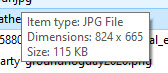
Mouse over your image in the file folder, wait a moment, and a box will pop up with information on the type, dimensions (in pixels, width x height), and size (in kilobytes or megabytes [FYI, there are 1000 kilobytes in a megabyte.).
If your image is more than 800 pixels wide, then you will probably want to resize it. Most places won’t need an image that big, and you’ll be saving them time if you resize it for them.
If the image they gave you is the entire cover, front and back, you’ll want to create a version that is only the front. To do this, use one of the programs above to crop the image and save-as to a different file.
I usually make 4 copies of the front cover, one at 800 pixels wide, one at 600 pixels wide, one at 400 pixels wide, and one at 200 pixels wide. If you have those on hand, then you can ask what size the publisher or website needs from you. NOTE: in any graphic program, you can set it so the height adjusts in proportion to whatever you set the width. No math required.
Use one of these online sites to create polished, professional promotional images for your book. They’re easy to use and intuitive.
We only list professional markets (or otherwise interesting markets) because we believe you should always aim high first. Please let us know if you sell something! We can help you promote it.
Consider how many emails you send out in a day. The signature on your email (that piece at the bottom that your email provider automatically attaches) is powerful landscape for promoting your work to people with whom you’re in contact. If just one such email connects with a potential reader, then you’ve won the day.
You set your signature in the Settings of your email program. Here are instructions for the two most common.
❖
Outlook
Click File, then Options, then Mail, then Signatures.
Click the signature you want to edit, and make your changes in the Edit signature box.
When you’re done, be sure to select Save and then OK.
❖
Gmail
Open Gmail.
At the top right, click Settings (the cog icon) and then See All Settings.
Scroll down to the “Signature” section and add your signature text in the box. (You can add images or format the text.)
Very important: when you’re done, be sure to scroll all the way to the bottom of the page and click Save Changes.
❖
Critical Information to Include
(in order of importance)
link to your website or Facebook page (your primary public space)
link to wherever your latest book is being sold
links to your other social media accounts
❖
Some Tips
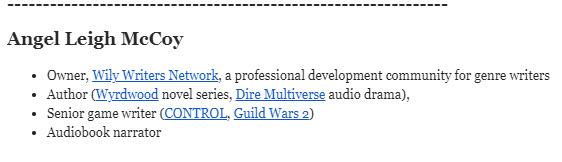
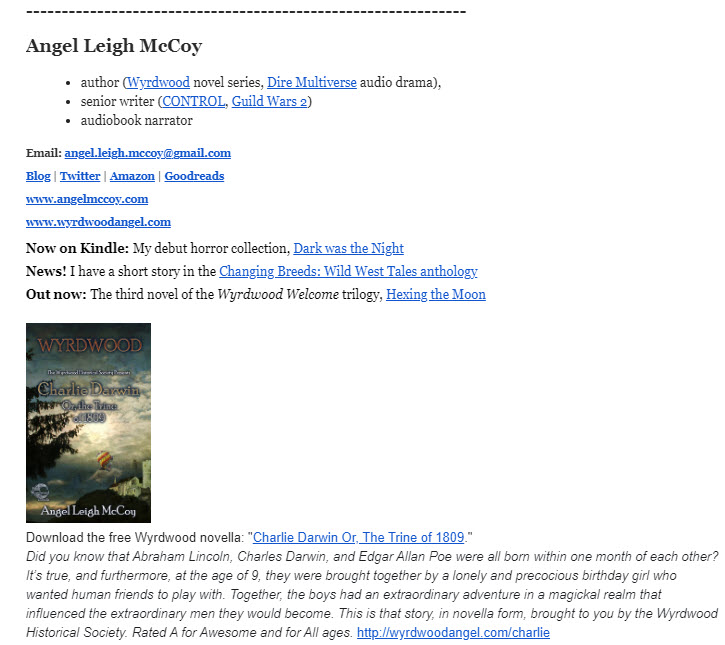
See samples below.
Spell out your full professional name in your signature. If you use a pseudonym, put it here. You can use “Writing as [pseudonym]” if you sign your emails with your real name.
Put a line or other visual divider at the top of your signature to set it apart from the body of the email.
Many email providers let you create more than one signature to use in different situations.
For example, Gmail will let you set which signature it uses for a new email versus a Reply email. This lets you use the long signature for first-contacts, but the short one for further conversation.
Gmail then also lets you choose which sig you use when you write a new email (at the bottom of the email, click on the pen icon).
Don’t make your Reply signature too big.
You can add images, but don’t use images that are too big. Remember that it will slow down and clog up your receiver’s inbox.
I recommend no bigger than 200-pixels-wide for a cover image. (See the article entitled “Image Editing” for more depth on this.)
Set the dots per inch (dpi) to 72 pixels.
❖
Sample Signatures
Short Signature: Medium-Length: Long:
❖
Did this inspire any ideas? Share them in a comment.
Members, do you have an area of expertise or a lesson learned that you’d like to share on our blog?
❖
The Wily Writers Mission Statement
With an orientation on service, we cut through the noise and enhance author careers via focused education, inspiration, and promotional opportunity.
Please make sure that your content is in line with our mission statement.
❖
Important
Applies only to members and invited writers.
Wordcount Limit: 1000 words — we prefer content that is concise, easily consumable, and direct.
You can submit either the written post or a proposal for what you want to do.
Please make sure you’ve given it a professional-level revision and edit before you submit it.
By submitting, you are giving WilyWriters.net permission to publish the submitted material on their blog. If at any time, you want it removed, you must give 30 days’ notice via email to wilywriters@gmail.com.
Wily Writers does not pay for blog posts. You are doing a service for your peers.
Wily Writers may edit your post for grammar and possibly improved layout. We will only alert you if we want to change the actual content.
Wily Writers reserves the right to reject any article for any reason.
You may include affiliate links in your article.
If you have any questions, please contact wilywriters@gmail.com.
You’re a dark fiction writer who believes (or wants to believe) that writing fiction is an art form and who wants to commune with others of the same mind. You’re a dark fiction writer seeking ways to connect with your soulmate readers and thus increase the spread of your message, your prose, and your worlds.
You can join with a one-month free trial, or simply sign up for our newsletter. We occasionally send out announcements about articles, videos, updates to the shop, and resources available to non-members.
35 wily members and growing
❖
Did this inspire any ideas? Share them in a comment.